How to Make a Coaching Website in Canva (in One Afternoon)
Updated October 17, 2026 · AI Life is Good
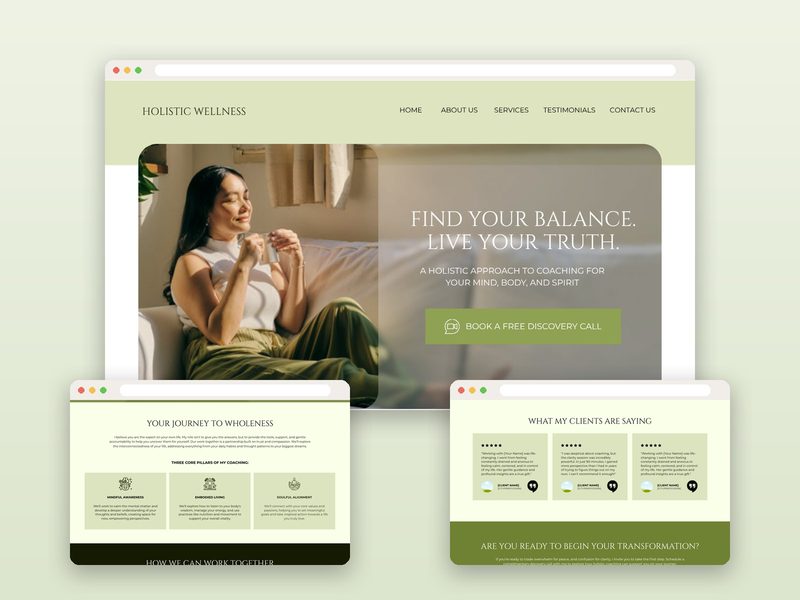
Most new coaches don't need a complex website. They need one clear page that explains who they help, how, and how to book a call. Canva's website feature is a fast, low-cost way to get there, especially if you start from a template.
Step 1: Decide what the site must do
For most coaches the answer is one action: book a discovery call. Every section should support that. Write it down before you touch design.
Step 2: Use a proven section order
- Hero: a one-line promise and a "Book a call" button.
- About: who you are and why clients trust you, in their language, not yours.
- Who it's for: three or four specific situations your ideal client recognizes.
- How it works / services: two or three packages with what's included.
- Testimonials: even one or two real quotes help.
- FAQ: pricing approach, session format, timeline.
- Final call to action and contact details.
Step 3: Write the copy first, then design
Draft each section in a doc. Keep sentences short. Swap every "I offer…" for "You'll…". If you use AI to help, give it your real client stories and ask it to keep your voice.
Step 4: Build it in Canva
Open a website template (or a blank website design), paste your copy section by section, replace photos with your own or brand-matching stock, and set your colors and fonts. Link buttons to your booking tool (Calendly, Acuity, TidyCal, etc.).
Step 5: Publish
Click Publish website. Choose a free Canva address or connect a domain you already own. Add a site title and description so it looks good in search results and when shared.
Common mistakes
- Too many pages and menu items for a brand-new practice
- A vague headline ("Unlock your potential")
- No button above the fold
- Forgetting to check the phone view
Start from a template
If you'd rather skip the blank page, our coaching website templates come with the structure and starter copy already in place: the Holistic Wellness Coach Website, the Executive Functioning Coach Website and the Speaker Website.
FAQ
Can you build a real website in Canva?
Yes. Canva Websites lets you publish a responsive site on a free my.canva.site address or connect a domain you own. It works well for one-page and small multi-section coaching sites.
Do I need Canva Pro to publish a website?
No. You can publish with a free Canva account. Some features, like certain premium elements or extra domain options, may require a paid plan.